Feed
The Feed is your live stream of what's happening in the Wietly community. Open it by tapping Feed in the bottom navigation bar.
Friends vs. Discover
At the top of the Feed you'll see two tabs:
- Friends — Shows check-ins from people you follow. This is your personal feed — the people you know, the spots they've been to, and what they've been smoking.
- Discover — Shows public check-ins from the wider Wietly community. Great for finding new spots, strains, and interesting posts from users you don't follow yet.
Reading a check-in card
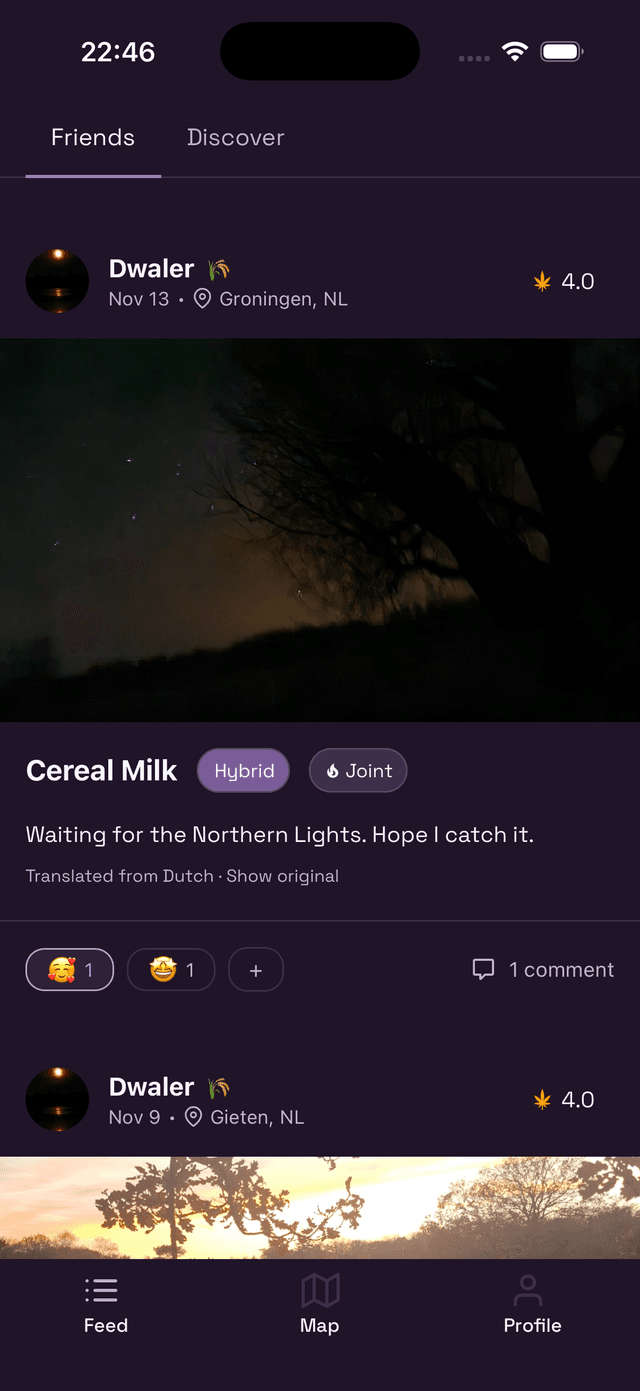
Each card shows:
- The user's profile photo and name
- The date and location of the check-in
- Their overall rating (leaves icon)
- The strain name, type (Sativa/Indica/Hybrid), and method (Joint, Bong, etc.)
- A photo if they added one
- Their personal note about the session
Reactions
Tap the reaction row at the bottom of a post to react with an emoji. Tap the + button to see all available reactions and pick one.
Tapping an existing reaction from someone else adds yours alongside it. Tap your own reaction again to remove it.
Comments
Tap comment on the right side of the reaction row to open the comments thread. You can reply to any check-in and start a conversation.
Translated posts
If a friend writes their check-in in another language, Wietly automatically shows a translation below their note. Tap Show original to see the original text.